Ollama GPU Offload & Context Length Tuning: Fixing CPU Fallback, OOM & Slow Token Generation
How to diagnose partial CPU/GPU memory splits with ollama ps, override Ollama's VRAM-based default context lengths (4k/32k/256k), and configure OLLAMA_CONTEXT_LENGTH, num_ctx, and CUDA_VISIBLE_DEVICES.
If generation slows down, first check the loaded model, current context size, concurrent requests and reported CPU/GPU placement. Partial offload can be one cause, but model size, backend, drivers, thermals and competing processes also matter. There is no fixed 70%–90% speed penalty that applies to every system. The Ollama context length documentation and FAQ describe the relevant controls.
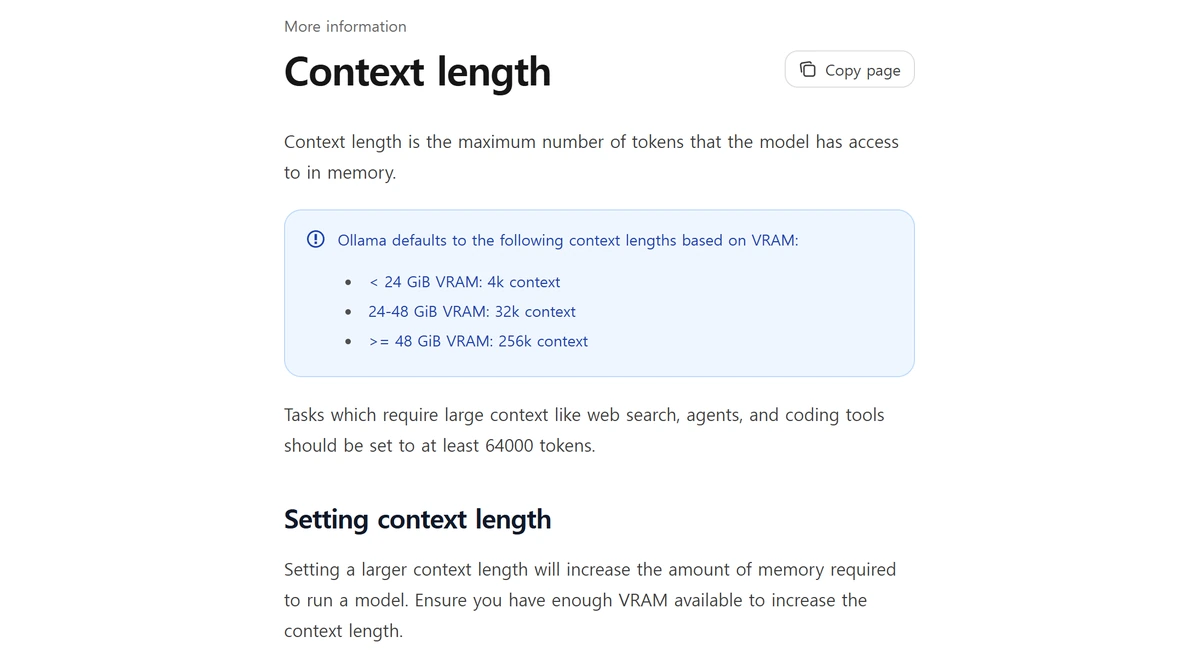
By default, Ollama assigns context length automatically based on your hardware's detected VRAM tier: systems with less than 24 GiB VRAM default to a 4k (4,096-token) context window; systems with 24–48 GiB VRAM default to a 32k context window; and systems with 48 GiB or more VRAM default to a 256k context window. For agentic coding, tool use, and web-search workflows, Ollama recommends configuring at least 64,000 tokens of context—provided your GPU has sufficient headroom for the expanded KV cache.
Verifying 100% GPU Offload with ollama ps and Setting num_ctx
While a model is loaded, ollama ps reports its size, context and PROCESSOR placement. The Ollama FAQ guide describes 100% GPU, 100% CPU or a split such as 48%/52% CPU/GPU. Use that report together with backend allocation logs; a percentage alone does not establish exact free VRAM, cache layout, speed or the reason for an offload.
If increased context leads to offload, reduce num_ctx and check again. On Linux/macOS shells, OLLAMA_CONTEXT_LENGTH=16384 ollama serve sets a server default. On Windows PowerShell, set $env:OLLAMA_CONTEXT_LENGTH="16384" before starting ollama serve; a background app must be restarted with the intended environment. Per-request options or an interactive /set parameter num_ctx can override defaults.
Checking GPU Residency with ollama ps & Setting Context Length via CLI / API
# 1. Verify active model memory size, GPU split, and allocated context
ollama ps
# NAME            ID              SIZE      PROCESSOR    CONTEXT    UNTIL
# example-model   example-id       ...      100% GPU      32768     ...
# Illustrative output; inspect your actual model and memory usage.

# 2. Launch Ollama server with a 64K default context window for coding agents
OLLAMA_CONTEXT_LENGTH=64000 ollama serve

# 3. Override num_ctx per API call without restarting the server
curl http://localhost:11434/api/generate -d '{
  "model": "llama3.2",
  "prompt": "Summarize the repository architecture.",
  "options": { "num_ctx": 16384 }
}'
Persistent Modelfile Profiles, Systemd Env Vars & Multi-GPU Pinning
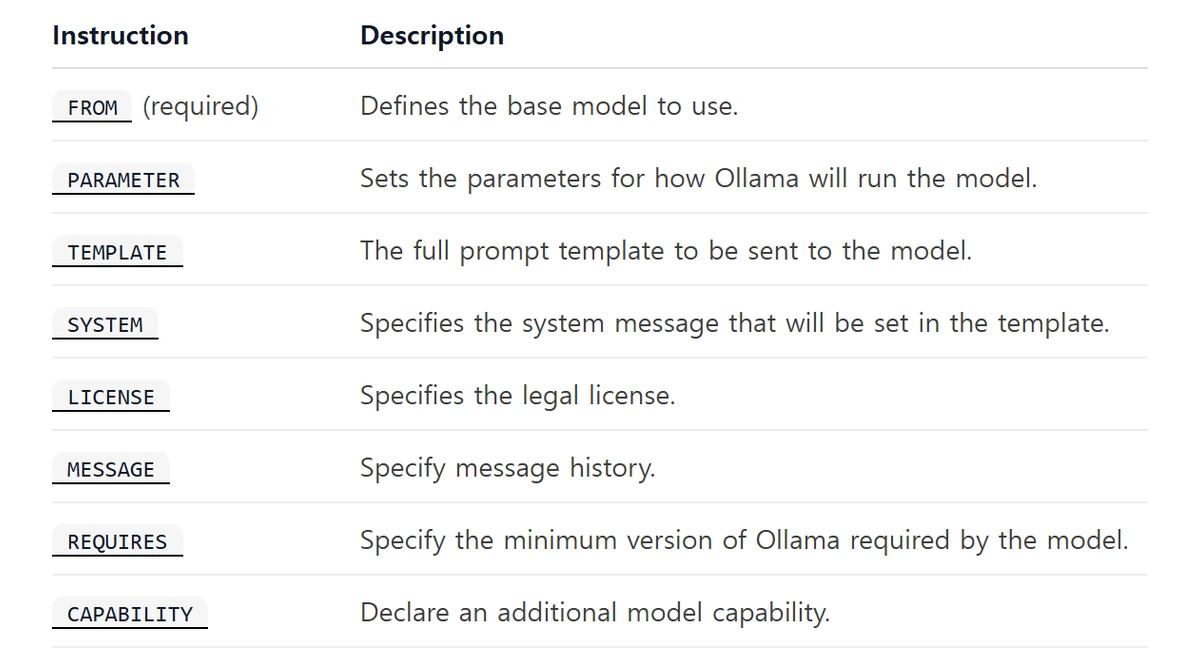
The Ollama Modelfile specification allows a default such as PARAMETER num_ctx 32768 on a named model. A client can send an explicit num_ctx option that overrides a default, so a Modelfile alone does not guarantee the final context used by every IDE or agent. Inspect the actual request and loaded context after applying a profile.
| Configuration Target | Platform / Scope | Exact Command or Parameter | Verification Method |
|---|---|---|---|
| Default Context (<24 GiB VRAM) | Automatic Tier | 4k (4,096 tokens) default | Check CONTEXT column in ollama ps |
| Default Context (24–48 / >=48 GiB) | Automatic Tier | 32k (24–48 GiB) / 256k (>=48 GiB) | Check CONTEXT column in ollama ps |
| macOS Desktop App Env Var | macOS (launchctl) | launchctl setenv OLLAMA_CONTEXT_LENGTH 32768 | Restart Ollama.app and run ollama ps |
| Linux Systemd Service Env Var | Linux (systemd) | systemctl edit ollama.service -> Environment="..." | systemctl daemon-reload && systemctl restart ollama |
| Multi-GPU Device Pinning | NVIDIA CUDA | CUDA_VISIBLE_DEVICES=<GPU-UUID> | Discover UUID via nvidia-smi -L |
Finally, if your workstation has both an integrated GPU (or an older display card) and a dedicated high-VRAM card, or if ollama ps falls back to 100% CPU entirely, check the Ollama GPU hardware documentation. NVIDIA GPUs require Compute Capability 5.0+ and driver 550+ (or driver 570+ for Compute Capability 5.0–6.2 cards). On multi-GPU systems where numeric PCIe ordering shifts across reboots, run nvidia-smi -L to copy the target card's GPU-... UUID and bind it via CUDA_VISIBLE_DEVICES so Ollama allocates VRAM exclusively on your fastest accelerator.
Rate tables are a November 9, 2026 documentation snapshot with announced schedule changes shown where available. Calculators use stated assumptions and are estimates, not invoices or measured hardware benchmarks. Check actual usage categories, account terms, cache behaviour, runtime allocations and cloud endpoint rates for a production decision.
Primary Sources & Official Vendor Documentation
- Ollama Documentation · Context Length Defaults & OLLAMA_CONTEXT_LENGTH Configuration
- Ollama Documentation · Frequently Asked Questions (ollama ps, num_ctx & Environment Variables)
- Ollama Documentation · Modelfile Syntax & PARAMETER Reference
- Ollama Documentation · Hardware Support, NVIDIA Drivers & CUDA_VISIBLE_DEVICES