Local LLM GPU VRAM Calculator: GGUF Quantization Bit-Widths, KV Cache & Hardware Tiers
Estimate GGUF weight memory and architecture-based FP16 KV cache for four reference models. Use GiB consistently, include runtime allowance, and compare a capacity budget with actual available VRAM.
Start with the actual model architecture and the quantized file you intend to load. A model being called 32B does not specify its number of layers, KV heads, context-cache dtype or runtime workspace. The calculator uses four named reference architectures, a rounded parameter-count estimate for weights, FP16 KV cache, a user-selected runtime allowance and a 10% capacity reserve. It reports a memory budget rather than a promise that a particular GPU will run the workload.
The Hugging Face GGUF reference explains how a file carries quantized tensors and architecture metadata. Q4_K_M and Q5_K_M use mixed tensor precisions and block overhead, so 4.8 and 5.5 effective bits per weight are only planning approximations. Q8_0 is approximated at 8.5 bits per weight and FP16/BF16 at 16. Use the actual GGUF tensor/file footprint when you have it; a rounded 32B count is not an exact byte measurement.
Keep units consistent and calculate KV memory from architecture
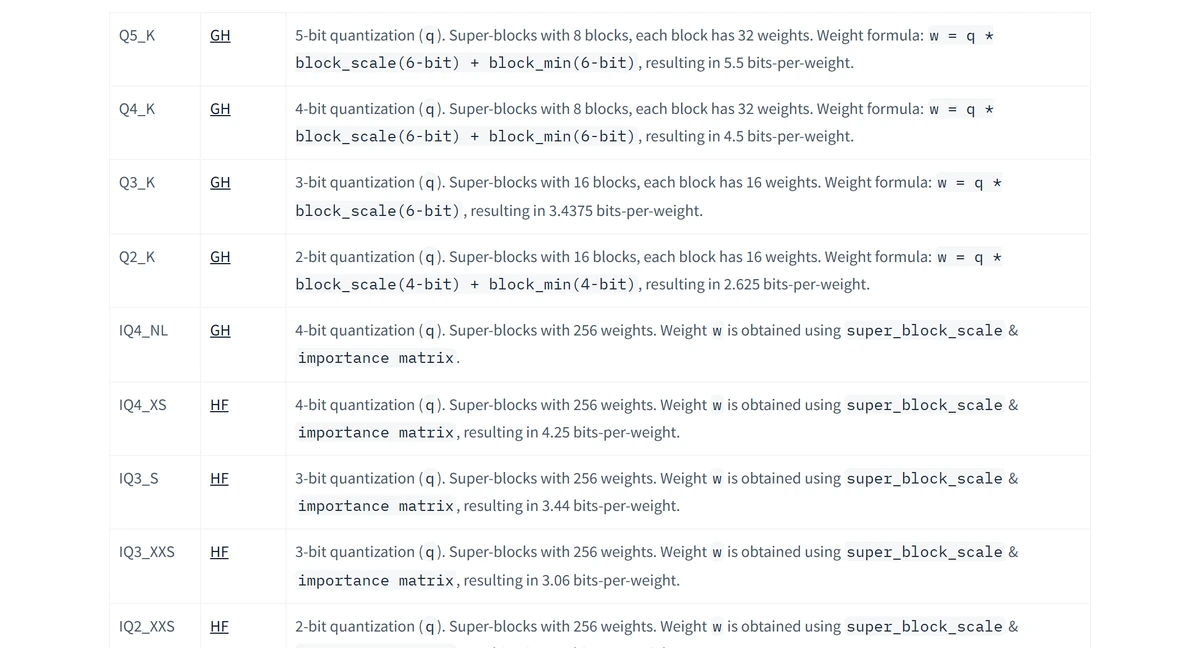
All memory values here use GiB: 1 GiB = 1,073,741,824 bytes. The weight estimate is parameters × effective bits per weight ÷ 8 ÷ 2^30. A 32-billion-parameter model at 4.8 bits per weight therefore has about 17.88 GiB of weights. Do not mix a decimal-GB weight calculation with a binary-GiB cache or device capacity.
For a conventional grouped-query transformer with FP16 KV cache, KV bytes = 2 × layers × KV heads × head dimension × allocated context tokens × 2 bytes × concurrent sequences. The first factor of two represents keys and values. Weight quantization does not automatically quantize the KV cache. Architectures with sliding-window attention, MLA or other cache layouts require a different model; this tool does not cover them.
The official DeepSeek R1 Distill Qwen 32B configuration has 64 layers, 8 KV heads and a head dimension of 5120 ÷ 40 = 128. At 32,768 tokens, one FP16 KV sequence uses exactly 8 GiB by this formula. Adding approximately 17.88 GiB of Q4_K_M weights and a 1 GiB workspace allowance yields about 26.88 GiB; a 10% reserve raises the capacity budget to 29.57 GiB. A 24 GiB card is below that budget.
Architecture-aware GiB estimator (FP16 KV; planning estimate)
def estimate_memory_gib(params_b, bpw, layers, kv_heads, head_dim,
                        context_tokens, sequences=1, runtime_gib=1.0):
    gib = 2 ** 30
    weights = params_b * 1_000_000_000 * bpw / 8 / gib
    kv = 2 * layers * kv_heads * head_dim * context_tokens * 2 * sequences / gib
    total = weights + kv + runtime_gib
    return {"weights": weights, "fp16_kv": kv, "total": total,
            "capacity_with_10pct_reserve": total * 1.10}

# R1 Distill Qwen 32B, Q4_K_M estimate, one 32K sequence:
example = estimate_memory_gib(32, 4.8, 64, 8, 128, 32768)
# weights ~17.88 GiB; KV 8.00 GiB; total ~26.88 GiB;
# capacity budget ~29.57 GiB. Validate against your backend's logs.
Compare complete workloads, not just parameter counts
Each row below uses the same Q4_K_M approximation, FP16 KV dtype, one 8K sequence and 1 GiB runtime allowance. This makes the architecture differences visible. The capacity column adds a reserve; it is not a measured minimum or a guarantee for a named graphics card.
| Reference model | Approx. weights | FP16 KV cache | Estimated total | Capacity tier with 10% reserve |
|---|---|---|---|---|
| Llama 3.1 8B | ~4.47 GiB | 1.00 GiB | ~6.47 GiB | 8 GiB+ usable VRAM |
| Qwen2.5 14B | ~7.82 GiB | 1.50 GiB | ~10.32 GiB | 12 GiB+ usable VRAM |
| R1 Distill Qwen 32B | ~17.88 GiB | 2.00 GiB | ~20.88 GiB | 24 GiB+ usable VRAM |
| Llama 3.3 70B | ~39.12 GiB | 2.50 GiB | ~42.62 GiB | 48 GiB+ usable VRAM |
Llama 3.3 70B in unquantized FP16 illustrates the capacity check: rounded weights use about 130.39 GiB, and one 32K FP16 KV cache uses 10 GiB. With a 1 GiB allowance, the estimate is 141.39 GiB before reserve and 155.52 GiB after reserve. Two 48 GiB GPUs provide 96 GiB in total and cannot hold that budget. A larger aggregate tier still needs a supported model split, sufficient memory per device and working interconnect/backend settings.
Reference model context limits also matter. Qwen2.5 14B ships with max_position_embeddings = 32,768 in the configuration used here; the calculator disables larger choices for that reference. Extended-context configurations must be checked separately. For the Llama choices we cite NVIDIA-distributed architecture metadata only; their FP8 weight format is not used as a claim about a GGUF file.
The Ollama context-length guide lists automatic context tiers of 4K below 24 GiB VRAM, 32K from 24 to below 48 GiB, and 256K at 48 GiB or above. These are runtime defaults, not a guarantee that every model supports or fits that context. The guide recommends at least 64,000 tokens for certain agent workflows; increase context only after checking the model limit and available memory.
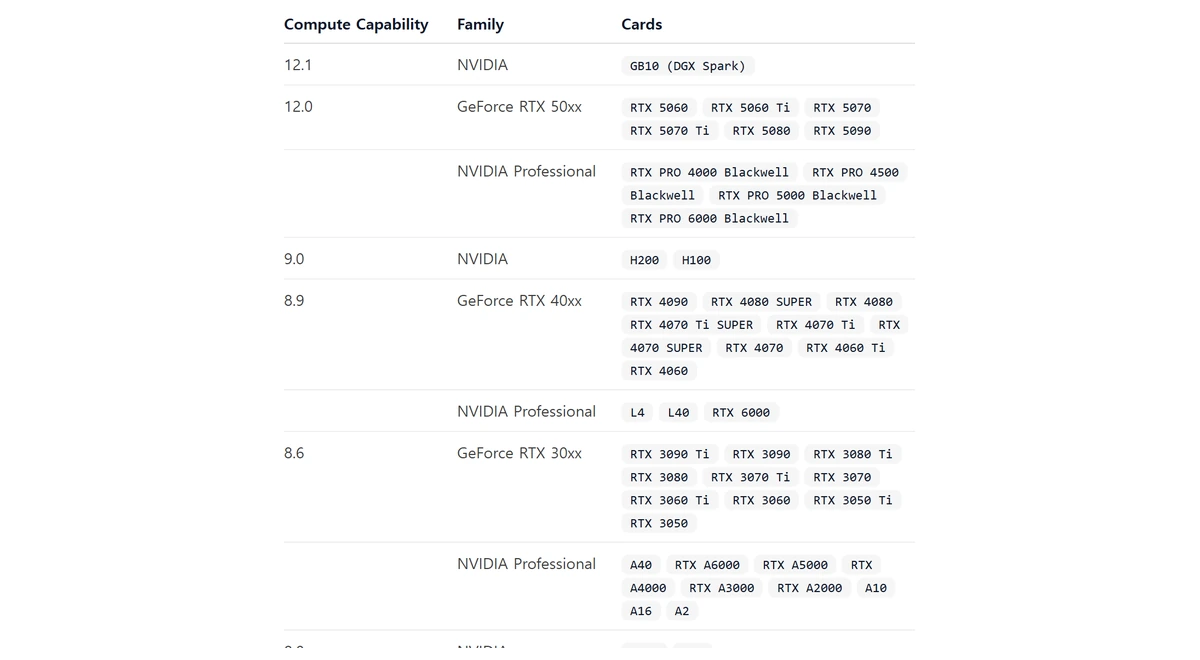
Memory estimates do not establish speed, driver compatibility or successful allocation. Free VRAM is lower than the headline capacity when the display or other processes use it. Unified memory also has operating-system reservations. Inspect actual model-load logs and ollama ps after selecting your file and context; adjust the runtime allowance for your backend, batch size and concurrent sessions.
Rate tables are a November 9, 2026 documentation snapshot with announced schedule changes shown where available. Calculators use stated assumptions and are estimates, not invoices or measured hardware benchmarks. Check actual usage categories, account terms, cache behaviour, runtime allocations and cloud endpoint rates for a production decision.
Primary Sources & Official Vendor Documentation
- Hugging Face Hub Docs · GGUF Binary Format, Metadata & Quantization Types
- Hugging Face Optimum Docs · Quantization Precision (FP16, BF16, INT8 & Low-Bit Weights)
- Ollama Documentation · Hardware Support & NVIDIA Compute Capability Matrix
- Ollama Documentation · Context Length VRAM Defaults (<24 GiB, 24–48 GiB, >=48 GiB)
- Llama 3.1 8B architecture metadata (NVIDIA distribution)
- Qwen2.5 14B official model configuration
- DeepSeek R1 Distill Qwen 32B official model configuration
- Llama 3.3 70B architecture metadata (NVIDIA distribution)